


2025 Microsoft Inclusion Changemaker Partner of the Year
Valorem Reply is proud to announce that we have been recognized as winner of 2025 Microsoft Inclusion Changemaker Partner of the Year Award
Read More
Semantic Kernel (SK) is an AI Software Development Kit (SDK) from Microsoft that brings you the large language capabilities of AI services like OpenAI to your apps. In this blog post, we wanted to share our key learnings from using Semantic Kernel to build Gen AI applications.
Semantic Kernel (SK) is an AI Software Development Kit (SDK) from Microsoft that brings you the large language capabilities of AI services like OpenAI to your apps. We’ve been excited since its launch and the subsequent announcements at BUILD 2023. We have used it for building several Gen AI applications and we love it. It's open source. It allows developers to easily integrate AI services using conventional programming languages like C# and Python. And there’s so much more to it than just an abstraction over the Open AI services. In this blog post, we wanted to share our key learnings from using Semantic Kernel to build Gen AI applications.
Why Semantic Kernel
TL; DR: For a .NET developer, Semantic Kernel provides you with a single SDK for developing Generative AI applications. Let’s say you’re creating a simple chatbot and need an SDK to call OpenAI API, Semantic Kernel lets you do that by exposing interfaces like IChatCompletion and ITextCompletion to interact directly with the API. Previously you would use something like Azure.AI.OpenAI Nuget package to do this.
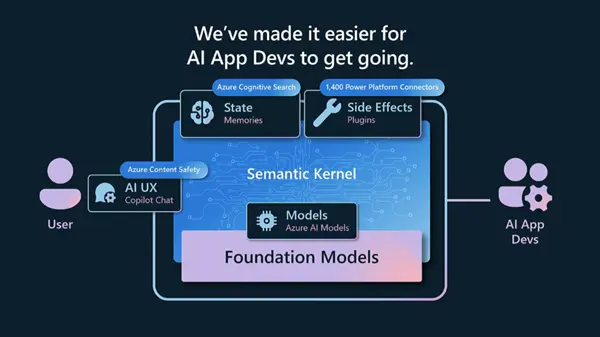
But Semantic Kernel is best known for its orchestration capabilities. The kernel can be used to create automated AI function chains or “plans” to achieve complex tasks without predefining the sequence of steps that need to happen. If it’s a slightly more complex app with multiple prompts for distinct functions, Semantic Kernel provides a great programming layer for it through semantic functions. This allows for easy logical separation of your C# logic and prompts. Using Semantic Kernel like this at all levels of AI development lets you scale your app incrementally in its AI capabilities. Let’s discuss some of these capabilities in detail.
Orchestration in Semantic Kernel
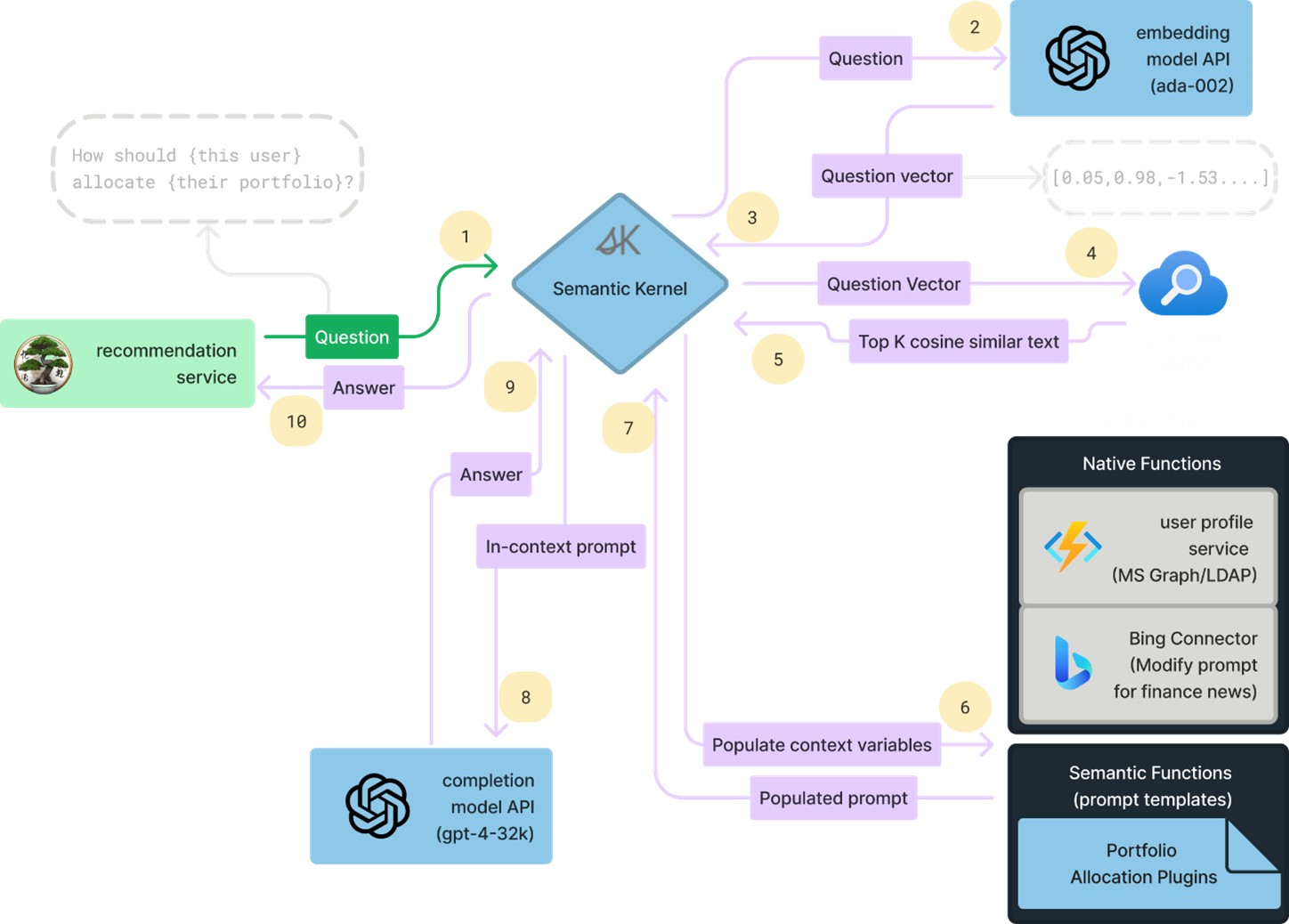
Here’s how orchestration works in Semantic Kernel-
The primary unit that drives orchestration within Semantic Kernel is a Planner. Semantic Kernel comes with a couple of built-in planners like SequentialPlanner. You can also write custom planners; here’s an example from the teams-ai package.
A planner is just another prompt that relies upon the description of semantic/native functions to decide which functions to use and in what order. Therefore, for this to work it’s imperative that the descriptions of both the function as well as its parameters are concise yet informative. Based on the collection of functions you have in your app, the descriptions of functions will have to be customized both to be unique amongst themselves as well as to be tailored towards the type of tasks that your app must carry out.
The enterprise applicability of planners is limited at the moment. A planner almost always needs GPT-4 to come up with effective plans (only for the planning part, the functions can be based on cheaper models). This plus the non-deterministic nature of planner means that you can run into unexpected token counts. Also, if you have semantic functions that do things like edit code, it can lead to unexpected disasters where a planner picks the wrong function for a task. If you do implement this in your app, make sure to include a plan review phase where a human looks at the plan and vets it before running.
On the bright side, the limited scope of enterprise applications for orchestration means that it is a free ground of opportunity to find the most useful and optimized use cases for it. For now, the real gold is in Semantic Functions.
Semantic Functions
The official documentation as well as the GitHub samples provide great details of the SDK usage, so we will skip repeating it. Getting a chat response is as simple as getting an instance of IChatCompletion, creating a ChatHistory, and calling GetChatCompletionAsync on the interface instance. But where things start getting interesting is with Semantic Functions. As an enterprise developer, I find this the most useful application of Semantic Kernel in the immediate future.
A semantic function is in a way a glorified name for an LLM prompt. The focus here is on the shift in how we interact with LLMs. Rather than telling the model every detail of the task we want and hoping it supplies a concise and relevant response, we create more atomic prompts focused on a single task instead. Consider the summarize skill from Semantic Kernel below-
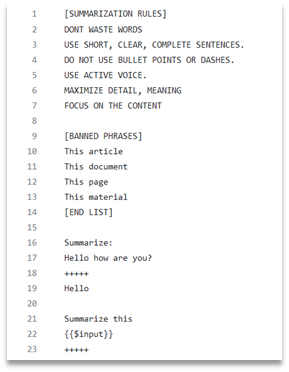
The prompt is concise and is focused on achieving a simple goal. This shift in thinking about LLMs as NLP functions provider rather than just a chatbot is important. The latest LLMs are exceptionally good at producing deterministic outputs when the prompt is focused on a single goal. Take a look at the other skills in GitHub to see Intent Detection, Calendar, etc.
There are also native functions which act as an interface for the LLM to interact with traditional code. For example, here’s the send email skill – which is one of the “core” skills in Semantic Kernel:
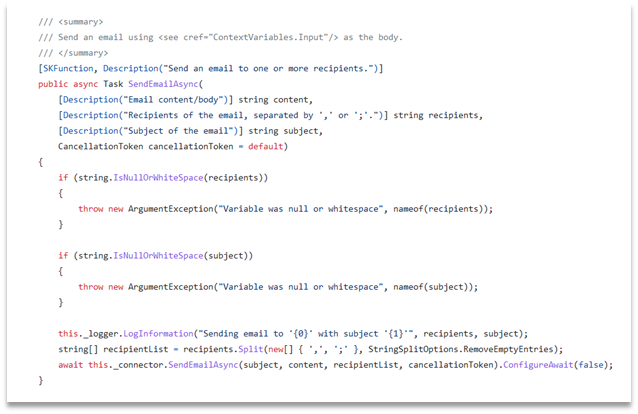
As seen above, a native function is pretty much a normal C# function which has semantic descriptions for the function itself and its parameters, exactly like semantic functions. On its own this isn’t particularly useful. If you were to do this manually it would be easier to get the output from a semantic function and pass it to native function in C#. The power is in exposing the native function to Planner via its descriptions. This becomes invaluable to expand the LLM capabilities when we get to chaining various semantic functions. The Semantic Kernel documentation covers details like prompt template syntax and config.json for prompt configuration.
Developer Notes
- As we move to designing enterprise solutions based on LLMs, an important goal of prompt design is to optimize cost based on token count. As we saw, we can make concise atomic prompts to achieve a single goal with high precision. However, it’s important to balance atomicity for your specific use case. For example, if your use case involves calling two semantic functions in a chain it might almost always be better to combine those prompts into one.
- Explore different models. GPT-4 is the most powerful model but using GPT-4 for everything will quickly rack up your token count costs. It is also slow compared to other models. Experiment with other models to see if they fit your purpose. Choose the model that you need, not want. To quickly try out a prompt against different models as well as keep track of token counts, check out Semantic Kernel Tools extension for VS Code.
- Because an LLM can only produce strings doesn’t mean you are limited to strings as the sole output. For example, you can write a native function that lets an LLM save a file to memory, then the LLM can output the key to which it wrote the file. Using this key, you can retrieve the file. Be creative in finding ways for LLM to interface with native code. Remember that behind the curtains most programming frameworks are based on magic strings.
Summary
Orchestration is a central piece of the Copilot stack. And Semantic Kernel is a strong player in this layer.
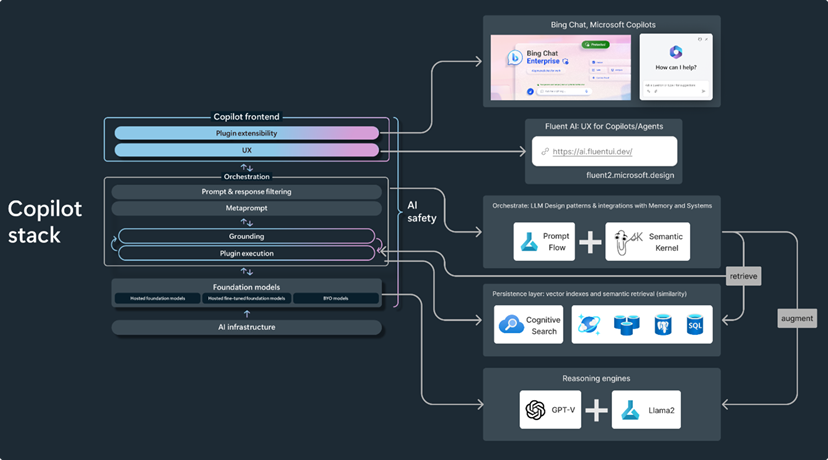
We hope this has been helpful in helping you understand the nuances associated with Semantic Kernel. We encourage you to refer to the official documentation for other important concepts in Semantic Kernel like Memories that increase the knowledge scope of LLMs. For seasoned developers, it’s fairly straightforward to implement.
Building effective applications based on LLMs is a shift in paradigm from classical programming. To that effect, we highly recommend reading the Schillace Laws for AI. Although named as laws, it gives you a good perspective on when to use LLMs, what can be accomplished with them, and common pitfalls.
If you’re interested in learning more about the power of Semantic Kernel and leveraging it to build custom Copilots or Gen AI apps for your organization, reach out to us.
Frequently Asked Questions (FAQs)
What is a Semantic Kernel and why should developers use it?


Semantic Kernel (SK) is an open-source AI Software Development Kit from Microsoft that integrates large language model capabilities from services like OpenAI directly into your applications. For .NET developers, it provides a single SDK for building generative AI applications using familiar programming languages like C# and Python. Rather than manually calling APIs, Semantic Kernel exposes developer-friendly interfaces like IChatCompletion and ITextCompletion. But its real power goes beyond simple API abstraction—it provides orchestration capabilities that allow you to create automated AI function chains to accomplish complex tasks without predefining every step. We recommend Semantic Kernel when you need a structured, scalable approach to integrating AI into enterprise applications.
How does orchestration work in Semantic Kernel, and what are its limitations?
Orchestration in Semantic Kernel is driven by a Planner—a specialized component that acts like a prompt-based decision engine. The planner examines the descriptions of your semantic and native functions, then automatically determines which functions to use and in what order to accomplish a goal. While this sounds powerful, there are important enterprise considerations: planners almost always require GPT-4 for effective planning (increasing costs), produce non-deterministic results that can lead to unpredictable token consumption, and can sometimes select incorrect functions for sensitive tasks like code editing. For now, orchestration works best for specific, well-scoped use cases. We recommend implementing a human review phase where domain experts validate the generated plan before execution in production environments.
What are semantic functions and why are they the most valuable part of Semantic Kernel?
Semantic functions represent a paradigm shift in how we interact with large language models. Rather than asking the LLM to handle every detail of a complex task in one massive prompt, semantic functions break down your AI capabilities into focused, atomic prompts—each designed to accomplish a single, well-defined goal. For example, instead of one prompt that summarizes, extracts metadata, and classifies text, you create three separate semantic functions, each optimized for precision. This approach delivers several benefits: improved output quality and determinism, easier testing and debugging, better cost control through optimization, and simplified composition into more complex workflows. In our experience, semantic functions are the most immediately applicable and valuable feature of Semantic Kernel for enterprise development.
How do native functions enhance Semantic Kernel's capabilities?
Native functions are regular C# or Python functions that serve as a bridge between your LLM prompts and traditional application code. Each native function includes semantic descriptions of its purpose and parameters, just like semantic functions. Individually, they're straightforward, but their real power emerges when exposed to the planner through their descriptions. This allows your LLM to intelligently determine when to call native functions as part of its reasoning process. For example, an LLM might decide to call a "send email" native function after determining that user intent matches specific criteria. This creates a powerful feedback loop where LLM reasoning drives your business logic, expanding AI capabilities far beyond text generation. Native functions are essential for building truly integrated Gen AI applications.
What's the best strategy for optimizing Semantic Kernel costs and performance?
Cost and performance optimization requires a multi-faceted approach. First, design atomic semantic functions that accomplish single, focused tasks—this minimizes token usage compared to monolithic prompts. However, balance atomicity with your use case: if you always call two functions in sequence, combining them into one prompt often reduces total token consumption. Second, resist the urge to use GPT-4 for everything. While it's the most capable model, it's also the most expensive and slowest. Experiment with smaller, faster models like GPT-3.5 for specific tasks where they perform adequately—you'll be surprised how often they work. Use GPT-4 strategically for complex reasoning tasks only. Third, use tools like Semantic Kernel's VS Code extension to quickly test prompts against different models and track token counts before production deployment. Finally, monitor token consumption in production continuously—costs can escalate quickly if you're not paying attention.
How can we leverage native functions to expand what's possible with LLMs?
Most developers think of LLM outputs as limited to strings, but this is a limiting mental model. Get creative with native functions to expand LLM capabilities. For example, you could create a native function that allows an LLM to save computed results to memory and return just a key—then your application code retrieves the actual data using that key. Or create native functions that format data in specific ways, validate outputs, or trigger external systems. Behind the scenes, most programming frameworks operate on "magic strings" anyway—databases accept SQL strings, APIs accept JSON strings, file systems accept file paths. Use this principle to create a rich interface between LLM reasoning and your application's capabilities. The more thoughtfully you design native functions and expose them to your semantic functions and planners, the more powerful your Gen AI applications become.
