


STORIES WE THINK YOU'LL LIKE


2025 Microsoft Inclusion Changemaker Partner of the Year
Valorem Reply is proud to announce that we have been recognized as winner of 2025 Microsoft Inclusion Changemaker Partner of the Year Award
Read More
Introduction
In today’s dynamic digital landscape, seamless integration across applications, data, and services is more than a technical requirement, it’s a fundamental driver of business agility and cost optimisation. Many organisations initially adopt MuleSoft for its robust features and API-led methodology. However, with cloud adoption soaring and IT budgets facing tighter scrutiny, leaders are reconsidering how best to achieve cost-effective, scalable integration.
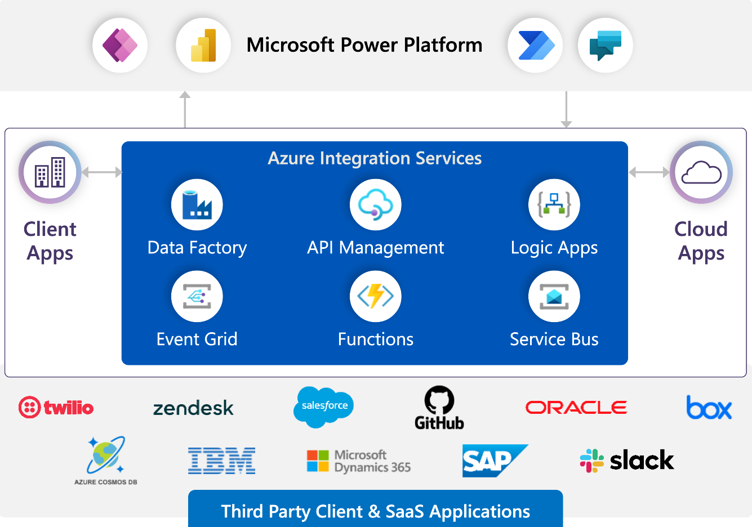
That’s where Azure Integration Services (AIS) comes in. AIS (encompassing Logic Apps, Service Bus, API Management, and Event Grid) not only reduces overheads but also fosters deeper alignment with the broader Azure ecosystem, particularly beneficial for those already invested in Microsoft’s cloud services.
Below, we explain why migrating to AIS could be a strategic move for your organisation and provide practical steps to ensure a smooth transition. By the end, you’ll see how a well-planned shift to AIS can help you streamline costs, embrace cloud-native innovation, and maintain the robust governance and reliability your enterprise demands.
Why Migrate?
1. Lower Costs
MuleSoft’s annual licensing fees can run into hundreds of thousands of pounds, escalating as you scale. By contrast, AIS’s pay-as-you-go model ensures you only pay for the integrations you actually use. This structure aligns especially well with organisations that are already leveraging Azure for other services.
2. Cloud-Native Capabilities
AIS is underpinned by Microsoft’s heavy investment in serverless and event-driven architectures. It integrates seamlessly with other Azure offerings (Azure Functions, Cognitive Services, etc.), paving the way for modernisation and advanced analytics. AIS’s real-time data flow, API management, and event-driven capabilities can also jump-start digital transformation initiatives.
3. Future-Proof Innovation
Because AIS is part of the ever-evolving Azure platform, its features continually expand to support emerging scenarios like AI-driven insights and automated workflows. Shifting to AIS sets you up to explore these next generation use cases without the overhead of additional third-party tools.
Valorem Reply’s 8 Steps for Migrating from MuleSoft to Azure Integration Services
At Valorem Reply, we specialise in enterprise integration and are a Microsoft partner focused on helping teams make the leap from MuleSoft to Azure Integration Services. Here’s how we approach it:
1. Assess Your Current Integration Landscape
Begin with a comprehensive audit of every MuleSoft flow, API, and connector across your organisation. Document each integration’s business impact, transaction volume, and technical dependencies. This inventory helps you prioritise which integrations to migrate first, ensuring you don’t overlook critical data flows.
2. Prioritise High-Value Integrations
Not all integrations carry equal weight. Some power revenue-critical processes, while others handle large, resource-intensive data loads. Target these high-impact areas first, especially those incurring the highest MuleSoft licensing costs. By demonstrating early wins, you build stakeholder confidence and quickly reduce recurring expenses.
3. Define Your Azure Integration Architecture
Before migrating anything, map out your AIS blueprint. Identify where Logic Apps, Service Bus, API Management, and Event Grid fit into your ecosystem. This upfront planning minimises ad-hoc deployments and paves the way for reusable components, making future integrations simpler to roll out.
4. Set Up Governance and Security
Strong governance and security measures are crucial from the outset. Establish naming conventions, resource group structures, and role-based access controls (RBAC). Leverage Azure Policy for automated compliance checks. A consistent, well-defined governance framework reduces audit complexities and prevents configuration drift.
5. Start Small with a Pilot
Rather than attempting a wholesale shift, pick a lower-risk integration to build a proof of concept (PoC) in AIS. This pilot phase offers an opportunity to refine your approach and validate performance in a controlled environment. It also helps confirm your cost assumptions before scaling to mission-critical workloads.
6. Run in Parallel (Where Possible)
For business-critical integrations, consider running them in parallel on both MuleSoft and AIS. This approach lets you mirror real-time data flows and verify performance while preserving operational continuity. Once AIS meets your performance and service-level requirements, retire the MuleSoft instance with minimal risk.
7. Train and Upskill Your Team
Shifting from MuleSoft to AIS is more than a simple technology swap; it requires new skills. Provide targeted training in Logic Apps, Service Bus, API Management, and Azure DevOps. Formal courses and certification programmes will enable your staff to fully harness AIS features and confidently tackle ongoing integration challenges.
8. Monitor, Optimise, and Refine
Finally, adopt a culture of continuous improvement. Use Azure Monitor, Log Analytics, and Application Insights to track throughput, spot performance anomalies, and manage costs. Regular performance reviews and iterative tuning will keep your integrations reliable and cost-efficient well into the future.
Conclusion
Migrating from MuleSoft to Azure Integration Services doesn’t just cut costs, it lays the groundwork for future-ready integrations that can scale with your business. By following a structured roadmap and leveraging AIS’s native cloud capabilities, you’ll be well positioned to capitalise on advanced analytics, AI, and other cutting-edge innovations.
Ready to start your migration? Reach out to Valorem Reply for a personalised assessment and end-to-end guidance on moving to AIS. Our integration specialists are here to help you maximise ROI, streamline governance, and fully embrace cloud-native solutions.
Frequently Asked Questions (FAQs)
Why would we migrate from MuleSoft to Azure Integration Services?


There are three compelling strategic reasons to consider migrating from MuleSoft to AIS. First, cost: MuleSoft's annual licensing fees often run into hundreds of thousands of pounds and escalate significantly as you scale. AIS operates on a pay-as-you-go model where you only pay for integrations you actually use, typically delivering 50–70% cost savings for organizations already invested in Azure. Second, cloud-native alignment: if your organization is committed to Azure for cloud infrastructure, data, analytics, and AI services, AIS provides seamless integration rather than introducing a disparate third-party platform.
AIS integrates natively with Azure Functions, Cognitive Services, Event Grid, and other Azure services, enabling more sophisticated use cases than MuleSoft can provide. Third, future-ready innovation: as an integral part of the Azure platform, AIS continuously evolves with new features for AI-driven insights, automated workflows, and event-driven architectures. Organizations on AIS can adopt emerging capabilities without additional tools or licensing. For most enterprises, the combination of cost reduction, ecosystem alignment, and innovation velocity justifies the migration effort.
What cost savings can we realistically expect from migrating to AIS?
Cost savings depend on your MuleSoft configuration, transaction volumes, and Azure commitment, but we typically see organizations achieve 50–70% reduction in integration platform costs. The math is straightforward: MuleSoft's licensing model charges for capabilities and throughput regardless of utilization, while AIS's pay-as-you-go pricing means you only pay for actual transactions and operations consumed.
For example, an organization paying £500,000 annually for MuleSoft might spend £150,000–250,000 on AIS for the same workloads. These savings are even more dramatic if you're already committed to Azure through other services, since you benefit from Azure's volume discounts and Enterprise Agreements. However, cost isn't the only financial consideration. Factor in migration effort (which we help minimize through structured approaches), training investment to upskill your team on AIS, and potential short-term productivity dips during transition. When calculated properly, most organizations see payback on migration investment within 12–18 months, with benefits compounding year after year.
How does Azure Integration Services integrate with the broader Azure ecosystem?
This is where AIS becomes genuinely transformative. Azure Integration Services isn't a standalone platform—it's a tightly integrated component of the Azure ecosystem. Logic Apps connects natively to Azure Functions for custom business logic, Azure Cognitive Services for AI capabilities, Azure Data Lake for advanced analytics, and Azure Machine Learning for predictive insights. Service Bus provides messaging at enterprise scale with deep integration into event-driven architectures. API Management extends beyond integration to become your complete API governance solution.
Event Grid enables real-time event-driven workflows across your entire Azure infrastructure. For organizations already leveraging Azure for infrastructure, databases, analytics, or AI, AIS eliminates the friction of point-to-point integrations with external platforms. Instead, you build a cohesive, cloud-native architecture where integration, computation, data, and intelligence work as a unified system. This architectural coherence enables sophisticated scenarios that would be difficult or impossible with MuleSoft—like triggering automated ML model retraining based on data integration events, or using cognitive services to intelligently route data based on content analysis.
What's the right approach to migrating integrations from MuleSoft to AIS?
Migration success depends on structured planning rather than a "big bang" rewrite. We recommend Valorem Reply's 8-step approach:
(1) Assess your entire MuleSoft landscape to understand all integrations, dependencies, and business criticality;
(2) Prioritize high-value integrations—those generating the highest costs or supporting revenue-critical processes—to deliver quick wins;
(3) Design your AIS architecture upfront, mapping Logic Apps, Service Bus, API Management, and Event Grid to your specific needs;
(4) Establish governance and security immediately with naming conventions, role-based access controls, and Azure Policy for compliance;
(5) Run a pilot on a lower-risk integration to validate your approach and refine processes;
(6) Execute parallel runs for mission-critical integrations, running both MuleSoft and AIS simultaneously until AIS proves reliability;
(7) Train your team thoroughly—this is a technology shift that requires new skills;
(8) Establish continuous monitoring and optimization practices. This methodical approach minimizes risk, maintains business continuity, and builds organizational confidence in AIS.
What are the risks of migrating from MuleSoft, and how do we mitigate them?
The primary risks are operational continuity during transition and team capability gaps. Operational risk is managed through the parallel-run approach—running critical integrations on both platforms simultaneously until AIS demonstrates equivalent performance and reliability. This lets you validate before retiring MuleSoft. Another risk is team skill gaps; MuleSoft developers won't automatically be productive in AIS. Mitigate this through formal training in Logic Apps, Service Bus, API Management, and Azure DevOps.
Some teams find MuleSoft's visual design paradigm easier than Logic Apps' workflow model, so expect a brief learning curve. Technical risk exists around performance at scale—AIS is robust, but your specific workloads may have different characteristics than MuleSoft. Address this through thorough pilot testing and proof-of-concept validation before migrating high-volume integrations. There's also organizational inertia risk; teams comfortable with MuleSoft may resist change. Counter this by demonstrating cost savings and new capabilities early, involving key stakeholders in the decision-making process, and celebrating quick wins. Finally, there's vendor lock-in risk—you're committing deeper to Microsoft Azure. This is a valid concern for multi-cloud strategies, but for most organizations already Azure-invested, deeper integration is a feature, not a bug.
How long does a typical migration from MuleSoft to AIS take?
Timeline depends on your portfolio complexity and organizational capacity. A small environment with 10–15 straightforward integrations might migrate in 3–6 months. A large enterprise with 100+ complex integrations across multiple business units might span 12–18 months.
The sequential nature of our 8-step approach builds in natural phases: assessment (2–4 weeks), architecture design (4–6 weeks), governance setup (2–4 weeks), pilot execution (6–8 weeks), parallel runs and team training (8–12 weeks), and production migration with monitoring (8–12+ weeks). This extended timeline might seem long, but it's actually shorter and lower-risk than alternatives. The critical insight is that you don't need to migrate everything simultaneously. Prioritize high-value integrations and deprecate them first. Less critical integrations can migrate later. Some organizations find that 60–70% of their integration value comes from 20–30% of integrations, so focusing there delivers outsized business impact. Also factor in that parallel running for critical integrations takes time but is essential for risk management. Rushing migration is the fastest path to operational failures, so we consistently recommend prioritizing thoroughness over speed.
How do we prepare our team for the shift from MuleSoft to AIS?
Team readiness is critical to migration success. Begin by assessing current skills—understanding who has integration experience, who's strong in cloud technologies, and who might resist change. Then implement a structured training program: formal courses in Azure Logic Apps, Service Bus, API Management, and Azure DevOps; hands-on labs where teams build simple integrations in AIS; certification paths (Microsoft Azure certifications add credibility); and mentoring from experienced AIS practitioners (this is where partnerships like Valorem Reply add value). Create early adopter groups who lead the migration and become internal champions, helping peers learn and troubleshoot. Provide documentation and playbooks specific to your migration—generic AIS documentation doesn't address your specific patterns and architecture.
Most importantly, make time for learning. Don't expect your team to master AIS while executing migration work simultaneously. Allocate dedicated learning time, bring in external expertise where gaps exist, and accept that productivity will dip temporarily before improving beyond MuleSoft baselines. Organizations that invest significantly in team capability typically see better outcomes than those trying to cut corners on training.
What ongoing monitoring and optimization should we implement in AIS?
Successful migrations don't end at go-live. Establish continuous monitoring from day one using Azure Monitor, Log Analytics, and Application Insights. Track four critical metrics: throughput and latency (ensuring AIS meets performance requirements), error rates and reliability (targeting 99.9%+ uptime), cost consumption (monitoring for unexpected spikes), and business impact metrics (time-to-delivery for new integrations, defect rates, team productivity). Set up alerting for anomalies—unusual latency, elevated error rates, or cost spikes—so you can respond quickly.
Implement Azure Policy to prevent configuration drift and enforce governance standards automatically. Schedule regular performance reviews (quarterly at minimum) to identify optimization opportunities. AIS pricing is consumption-based, so optimization directly impacts costs. For example, batching individual messages into arrays, using message deduplication, or optimizing transformation logic can reduce transaction counts significantly. Create a feedback loop where teams running integrations report issues and improvement opportunities; this builds continuous improvement into your culture. Most organizations see costs stabilize and performance improve over 6–12 months as they optimize based on actual usage patterns. Committing to ongoing optimization is often where organizations unlock the full value of the migration.
