


2025 Microsoft Inclusion Changemaker Partner of the Year
Valorem Reply is proud to announce that we have been recognized as winner of 2025 Microsoft Inclusion Changemaker Partner of the Year Award
Read More
Open your Azure Policy compliance dashboard. If it’s mostly red, the problem usually isn’t your application teams. It’s how your policies are designed.
Azure Policy is one of the most powerful governance controls Microsoft offers. Used properly, it lets you enforce organisational standards on every resource deployed in Azure — and, through Azure Arc, well beyond it. The catch is that Policy is not a turnkey product. It needs deliberate design, and the gap between “assignment” and “actually enforcing” is where most organisations come unstuck.
This is why so many environments carry low compliance scores and why platform teams spend disproportionate time chasing application teams to remediate non-compliant deployments. At any meaningful scale, that approach simply doesn’t work.
The MCSB Trap: Built-In Doesn’t Mean Enforced
Microsoft provide an extensive library of built-in policy definitions and initiatives covering CIS, NIST, FedRAMP and other common frameworks. It’s a strong starting point, but it sets a trap that catches many teams.
The effects exposed in an initiative’s parameters don’t always match the effects available in the underlying policy definition. If you only inspect one, you can easily assume a level of enforcement that isn’t actually there.
Take the Microsoft Cloud Security Benchmark — the default initiative applied to every subscription. It includes a policy called Azure Key Vault, which should have firewall enabled or public network access disabled. Inspect that policy definition directly, and it has a deny effect available. Inspect the same policy as it’s consumed inside MCSB, and the deny effect is gone.
This is largely by design. Microsoft tune built-in initiatives toward audit rather than deny so they work across the broadest possible set of customers without breaking anyone’s deployments. That’s a sensible default for them. It’s a problem for you if you assumed the initiative was doing what its name suggests.
The wider pattern is the same. A large number of built-in policy definitions only ship with audit or auditIfNotExists effects, even when deny is technically supported. In practice, that means your policies are generating compliance findings rather than preventing misconfigurations — and the burden shifts back onto your security and platform teams to chase remediation after the fact.
If a platform or security team relies mainly on audit-based policies, it’s doing more reporting than enforcement. The two are not the same.
What Good Looks Like
The goal is straightforward: every application deployed in Azure should meet organisational standards by default, at deployment time, not after the fact.
There are several ways teams try to achieve this. Architectural reviews and design approvals confirm intent — but intent and delivery are not the same thing. Audit-based policies flag non-compliance after deployment, but then someone has to raise the ticket, explain the issue, and persuade the application team to go back and fix it. Multiply that across hundreds of resources and dozens of teams, and it stops being a process. It becomes a backlog.
The approach that actually scales is to enforce governance at deployment time. Assign initiatives with a deny effect for the controls that should be mandatory. It takes more work to set up, but it pays back quickly because the wrong configuration is prevented at the door rather than chased through change tickets later.
Doing this well requires:
- Using built-in policies — but testing them against the effect you actually need, not the effect you assume they have
- Adopting Azure Landing Zone (ALZ) policies where they align with your standards
- Building custom policy definitions to close the gaps
- Providing aligned Terraform or Bicep modules so application teams can deploy correctly first time
- Restricting deployments to approved resource configurations
- Providing a workflow for policy exemptions so application teams have a route for legitimate exceptions
The combined effect is governance that shifts left: less operational drag, fewer arguments, and clearer expectations for the people actually building things.
The Three States of Policy
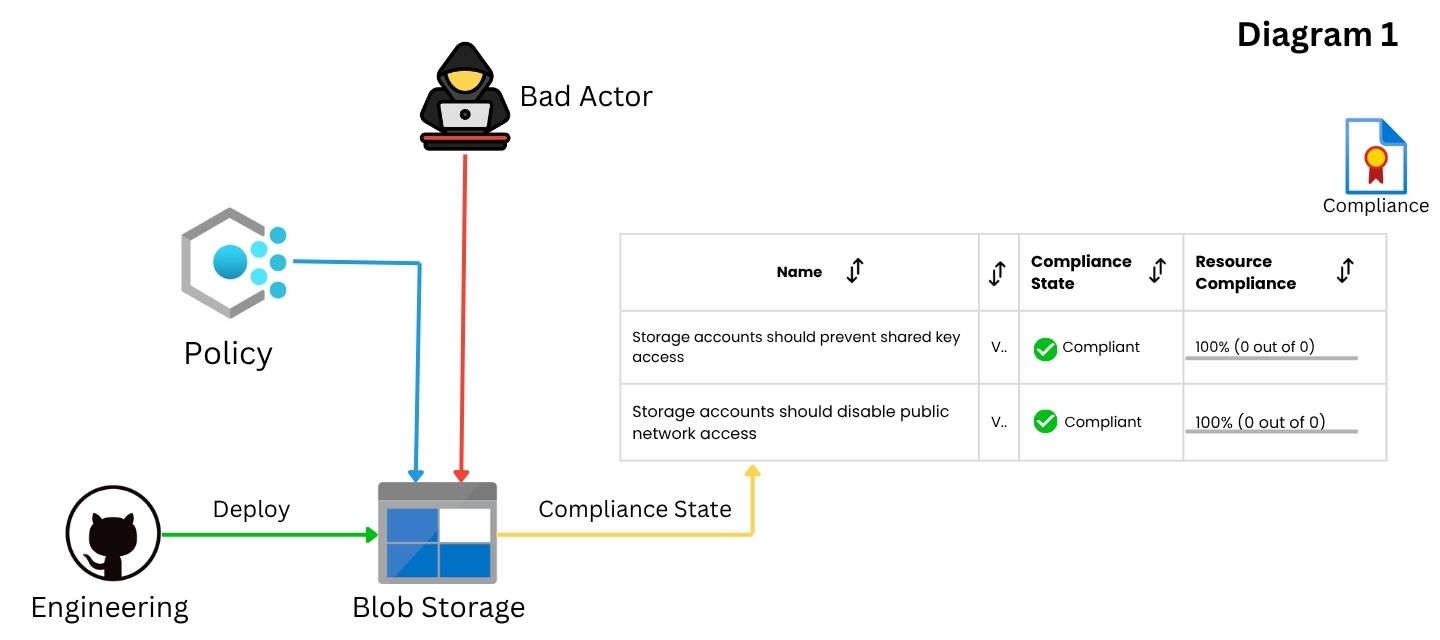
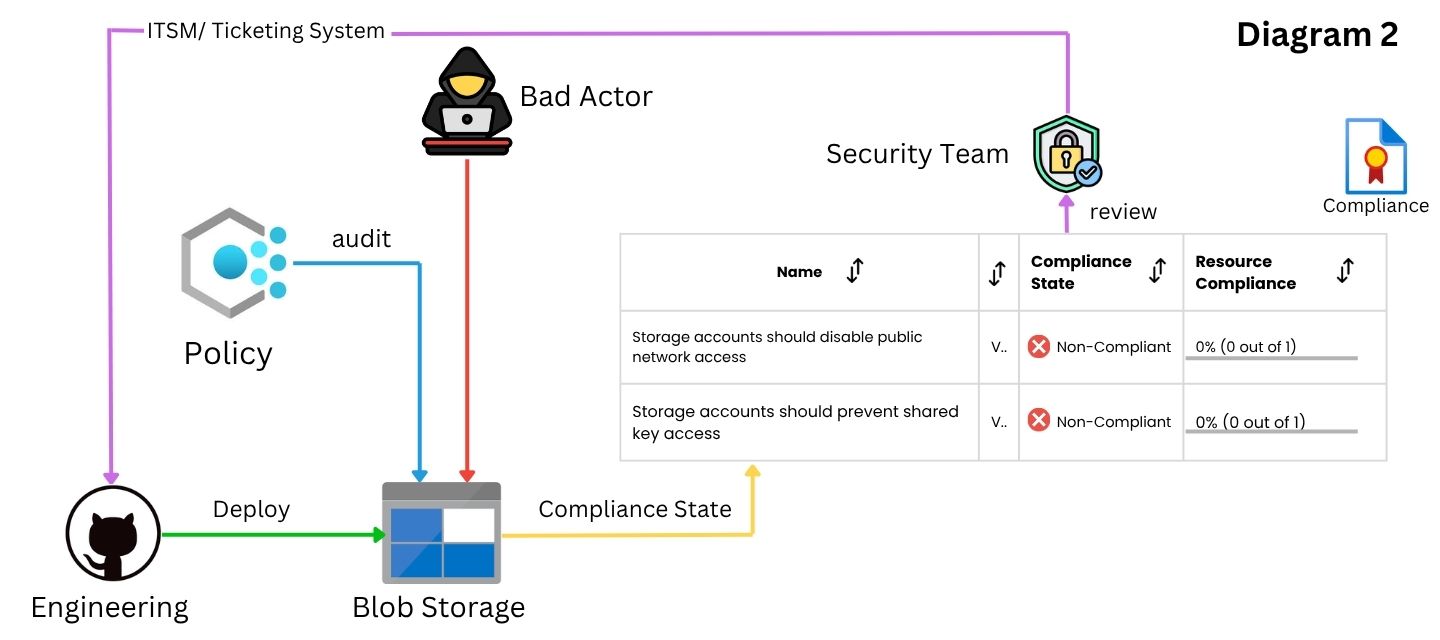
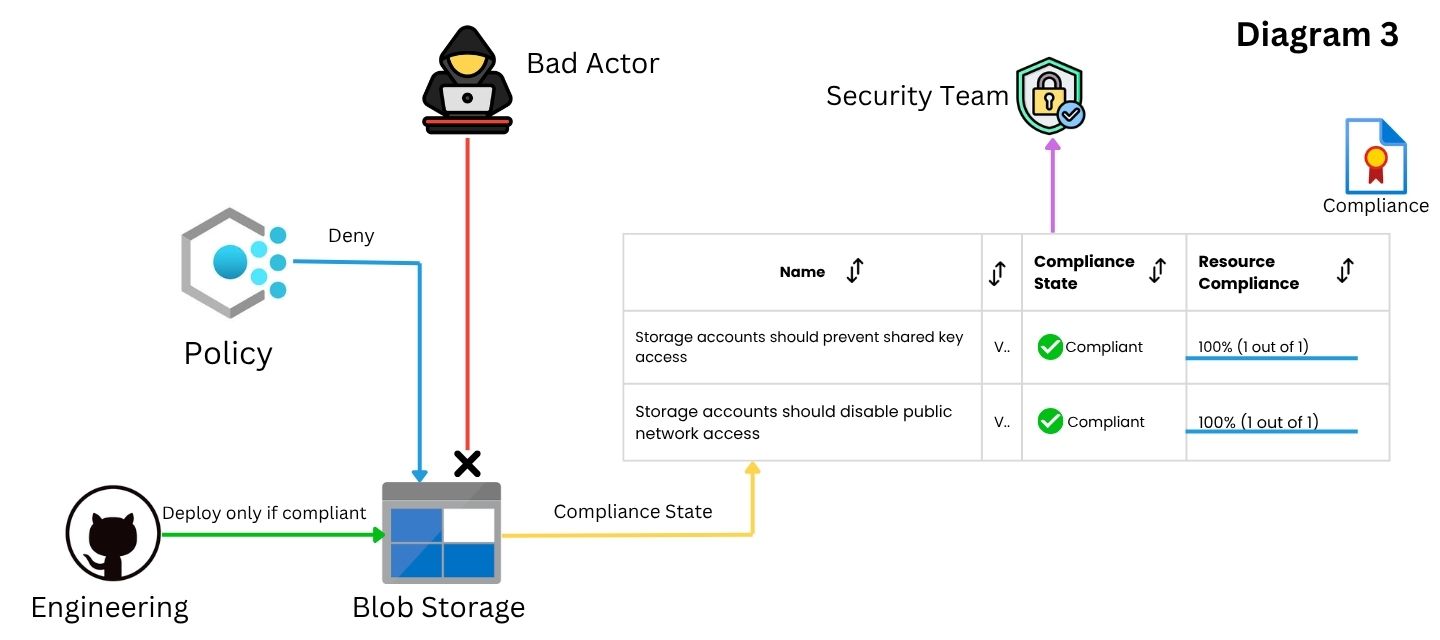
To make the difference concrete, here are two policies most organisations should care about: Storage accounts should disable public network access, and Storage accounts should prevent shared key access — applied with three different effects.
Effect: Disabled
The policies are deployed but disabled. Engineering creates the storage account however they like — public access, shared keys, anything goes — and the policies report compliant. The resource isn’t actually evaluated. You have the appearance of governance coverage, but no substance.
Effect: Audit
Engineering still deploys whatever they want, but now the policies flag the non-compliance. Someone in your team raises a ticket, explains the issue, asks the engineering team to change it, and waits. Repeat across every non-compliant resource, every subscription, every team. This is where most organisations live, and it’s why their compliance dashboards stay red.
Effect: Deny
Engineering deploys the storage account with public network access and shared key access disabled — because that is the only configuration the policy will accept. The deployment succeeds. The dashboard stays green. Nobody has to chase anyone. This is where Policy starts behaving like an engineering control rather than a reporting tool.
Where to Start
If your dashboard is red, don’t start by asking application teams to do better. Start by auditing your own policy estate. A useful first pass:
• Pick your top ten built-in policies and check the effect each one is actually using, not the effect you assumed it had
• Identify the controls that should be mandatory and move them to deny — starting with low-risk, high-value ones like public network access and shared key access on storage
• Pair every new deny policy with a Terraform or Bicep module that deploys the right configuration by default, so engineering teams aren’t left guessing
• Treat ALZ policies as a baseline to align with, not a finished product
AI and newer tooling will keep arriving, and they’ll solve real problems. But the organisations that get the most out of what’s coming next will be the ones who got the fundamentals right first. Azure Policy, used as an enforcement control rather than a reporting one, is one of those fundamentals.
Quick reference: Azure Policy terminology
• Policy definition — a rule describing a compliance requirement.
• Initiative — a collection of policy definitions, assigned as a group.
• Assignment — applying a definition or initiative to a scope.
• Scope — where the assignment lives: management group, subscription, resource group, or resource.
• Effect — what happens when the rule matches: deny, audit, deployIfNotExists, auditIfNotExists, and others.
• Built-in — a definition or initiative provided by Microsoft.
• Custom — one your team has authored.
• Alias — the field in a policy definition that maps to a resource property.
